Context-Aware Writing Tips for Professionals

Want to write better emails, reports, or proposals? Start by understanding your audience and purpose. Context-aware writing adapts your tone and style to fit the situation, making your message clearer and more effective. Here's what you need to know:
- Why It Matters: Even perfect grammar won't save a message that ignores its audience or tone. Tailoring your content ensures relevance and impact.
- Key Steps:
- Define your audience and goals (e.g., who you're writing for and why).
- Use tools like Revise to refine tone, structure, and style.
- Choose AI models suited for specific tasks, from emails to formal reports.
- Avoid Common Pitfalls: Over-relying on AI, unclear prompts, and inconsistent tone can hurt your writing.
Pro Tip: Spend 20–30% of your time revising. Tools like Revise can help, but human judgment is essential.
Preparing for Context-Aware Writing
Identify Your Writing Goals and Audience
Before diving into Revise, take a moment to define the WHO, WHAT, HOW, and WHY of your content. Who is your audience? What problem are you addressing? How will you deliver the message? And why are you writing it in the first place? These questions are essential to keep your writing focused and effective. Dean Brenner from The Latimer Group sums it up perfectly:
"If you don't spend that time thinking about your audience and gathering some intelligence about their needs and challenges, you are less likely to get the outcome you want."
Understanding your audience’s habits - like where they look for information and what they’re trying to achieve - helps you tailor your message. Set clear, measurable goals upfront, such as aiming for 500 clicks, 50 downloads, or 20 qualified leads. This keeps your content aligned with its purpose. Planning ahead also saves money and time, as catching errors early is far less expensive.
Once your goals are in place, it’s time to fine-tune your style preferences to match your professional standards.
Set Up Your Style Preferences in Revise
With your goals clearly defined, configure Revise to reflect your writing standards. Set specific style rules like “use active voice” or “limit sentences to 20 words” to ensure clarity and consistency. If you already have a style guide, you can upload it in PDF or Markdown format to give the AI a deeper understanding of your brand’s tone and guidelines.
Revise offers flexibility in editing - ranging from light tweaks to complete rewrites - and gives you the final say on every suggested change. Storm Silva, a history professor, shares their experience:
"For 8 bucks a month, it replaces my very expensive proofreader. Buy it. You'll love it as much as I do!"
To avoid unnecessary corrections, include industry-specific acronyms and terminology in your style preferences. This ensures the AI recognizes essential professional language instead of flagging it as an error.
Once your style is set, the next step is choosing the AI model that fits your writing needs.
Choose the Right AI Model for Your Needs
Revise provides various AI models tailored for different tasks. The Pro plan is perfect for routine writing like emails, short blog posts, and high-volume drafts, supporting up to 200,000 words per month. This plan includes premium models like GPT 5.1 and Gemini 2.5 Flash, which are efficient for quick, straightforward tasks.
For more demanding projects, the Ultra plan is the better choice. It features models like Claude Sonnet 4.5, designed for complex reports and public-facing materials, with a capacity of up to 2,000,000 words per month. These advanced models excel at analyzing context and ensuring consistency across lengthy documents.
Use the Ultra plan for high-stakes work, such as white papers or executive summaries, where tone and precision are critical. On the other hand, the Pro plan is ideal for internal memos or early drafts, offering faster processing while conserving your word allocation. This way, you can match the AI model to your specific needs, ensuring your content maintains its intended tone and purpose.
How to Build Your AI Writing System: The FULL Walkthrough
Checklist for Context-Aware Writing
When it comes to context-aware writing, having a clear strategy can make all the difference. Here's a practical checklist to help you apply these methods effectively.
Keep Ideas Flowing with In-Document Brainstorming
Revise's Document Chat feature is like having a brainstorming partner built right into your workspace. Instead of toggling between different tools when you're stuck, you can explore ideas directly in your draft. Depending on what stage you're at - whether you're aiming for creativity, precision, or speed - you can select an AI model tailored to your needs.
Feeling stuck? Switch to the "Creativity" model and ask targeted questions like "Who, What, Where, When, Why, and How" to dive deeper into your topic. Freelance writer Sarah Kim highlights the feature's versatility:
"The flexibility to adjust tone and style has helped me manage multiple client projects efficiently. It's like having a second brain."
For smoother integration of brainstormed ideas, use the "Intelligent Rewriting" tool to refine and organize points for better flow. Always enable change tracking when incorporating new content to keep full control over revisions.
Fine-Tune Tone for Professional Writing
Revise's Adjustable Rules & Intensity settings let you tailor the tone and style of your writing for any audience. Whether you need subtle tweaks or a bold rewrite, the intensity slider adapts to your requirements. For formal documents or reports, the "Precision" model ensures clarity and professionalism.
You can also use custom prompts, such as "write in a conversational but expert tone", to align the output with your audience's expectations. For international readers, adjust the tone to suit cultural preferences - softer language can be more effective in regions where indirect communication is valued. Growth marketer Michael Smith shares his experience:
"Revise can understand my language and style of writing to improve it greatly... delivering polished, contextually appropriate content."
Over time, the platform learns your unique voice and style. By actively accepting or rejecting specific suggestions, you help the AI refine its understanding of your preferences for future drafts. You can even set custom style rules to maintain consistency across large projects like email campaigns or manuscripts.
Let the AI Learn Your Style
One of Revise's standout features is its ability to adapt to your personal editing habits. The AI tracks which changes you accept or reject, gradually tailoring its suggestions to fit your unique writing style. This ensures that your voice remains intact, avoiding generic edits that lack personality.
As the tool learns your preferences, it becomes more effective over time. To date, Revise has processed over 2,000,000 words, saving users more than 1,000 hours of manual editing and achieving a 99% success rate in transforming content for over 500 active writers.
Capture Ideas Quickly with Voice-to-Text
For busy professionals, Revise's voice-to-text feature is a game-changer. It allows you to dictate ideas directly into your draft, making it easier to capture thoughts on the go. Whether you're in a meeting or away from your keyboard, this tool helps you document contextually relevant ideas before they slip away.
The Pro plan includes basic speech-to-text functionality, while the Ultra plan supports longer dictation sessions. Additionally, you can use voice-to-text within Document Chat to explore concepts verbally and have them seamlessly integrated into your draft.
Review AI Suggestions with Care
While AI tools are incredibly helpful, they're not a substitute for human judgment. Revise ensures that all suggestions are tracked separately, so your original content remains untouched unless you approve changes.
Before accepting any edits, take a moment to review them carefully. Reading suggestions aloud can help spot awkward phrasing, and always double-check key facts for accuracy. Start with big-picture elements, like structure and clarity, before moving on to smaller fixes like grammar and punctuation. Aim for a natural rhythm in your writing, with varied sentence lengths and structures to avoid a robotic feel.
sbb-itb-df9dc23
Tips for High-Volume and Specialized Writing
Manage High-Volume Writing Projects
Handling large-scale writing projects requires a solid framework and a clear strategy for revisions. Setting well-defined content goals can significantly increase your chances of success - by nearly four times, according to research. Establishing a governance model is crucial. This means outlining roles and production guidelines to ensure your brand voice stays consistent, even when multiple contributors are involved.
For high-volume needs, tools like Revise's Ultra plan come in handy with their generous word capacity. A helpful tip during the drafting process is to summarize the main point of each paragraph. This makes it easier to spot inconsistencies, especially when juggling multiple documents at once.
Another key to managing these projects is proper time allocation. Plan to dedicate 20% to 30% of your total project time to revisions. For more complex tasks, take at least a full day away from the draft before diving into edits. This break can provide the fresh perspective needed for effective revisions. Additionally, repurposing content can save you time and effort. For example, a single webinar can be transformed into a blog series, social media posts, and email newsletters, multiplying your output without starting from scratch.
Format Content for US Standards
While managing high-volume projects, it’s equally important to ensure your content meets regional formatting standards. For US audiences, this involves adhering to specific conventions like currency symbols ($), date formats (MM/DD/YYYY), and imperial measurements. Tools like Revise can help streamline this process with custom prompts that automatically format your content.
For instance, you can use prompts like "format all dates as MM/DD/YYYY and use imperial measurements" to maintain consistency across your project. This is particularly useful for technical documents where even minor formatting errors can hurt credibility. When referencing temperature, you can configure settings to default to Fahrenheit (°F) instead of Celsius, ensuring your content aligns with US norms.
Adjust Editing Intensity for Different Results
Once your formatting is in place, the next step is tailoring the editing process to your specific project needs. Revise offers adjustable editing intensity, giving you control over how much or how little the AI modifies your content. For example, when polishing a nearly finished draft, you can opt for a lighter touch. On the other hand, if you're brainstorming or doing a major rewrite, increasing the intensity allows for more substantial edits.
You can refine your results further by specifying parameters in your prompts. For example, you might request, "Write a business proposal for a CEO that is professional and concise". Or, you can ask the AI to adjust tone and style, such as making the text "friendlier", "more professional", or "simpler", depending on your audience and purpose. This flexibility is especially useful when adapting a single piece of content for different audiences. For instance, a technical white paper might require a lower-intensity edit for an executive summary but a higher-intensity rewrite for social media snippets. Revise’s context-aware recommendations ensure that every edit aligns with your intended tone and audience.
Common Context-Aware Writing Mistakes to Avoid
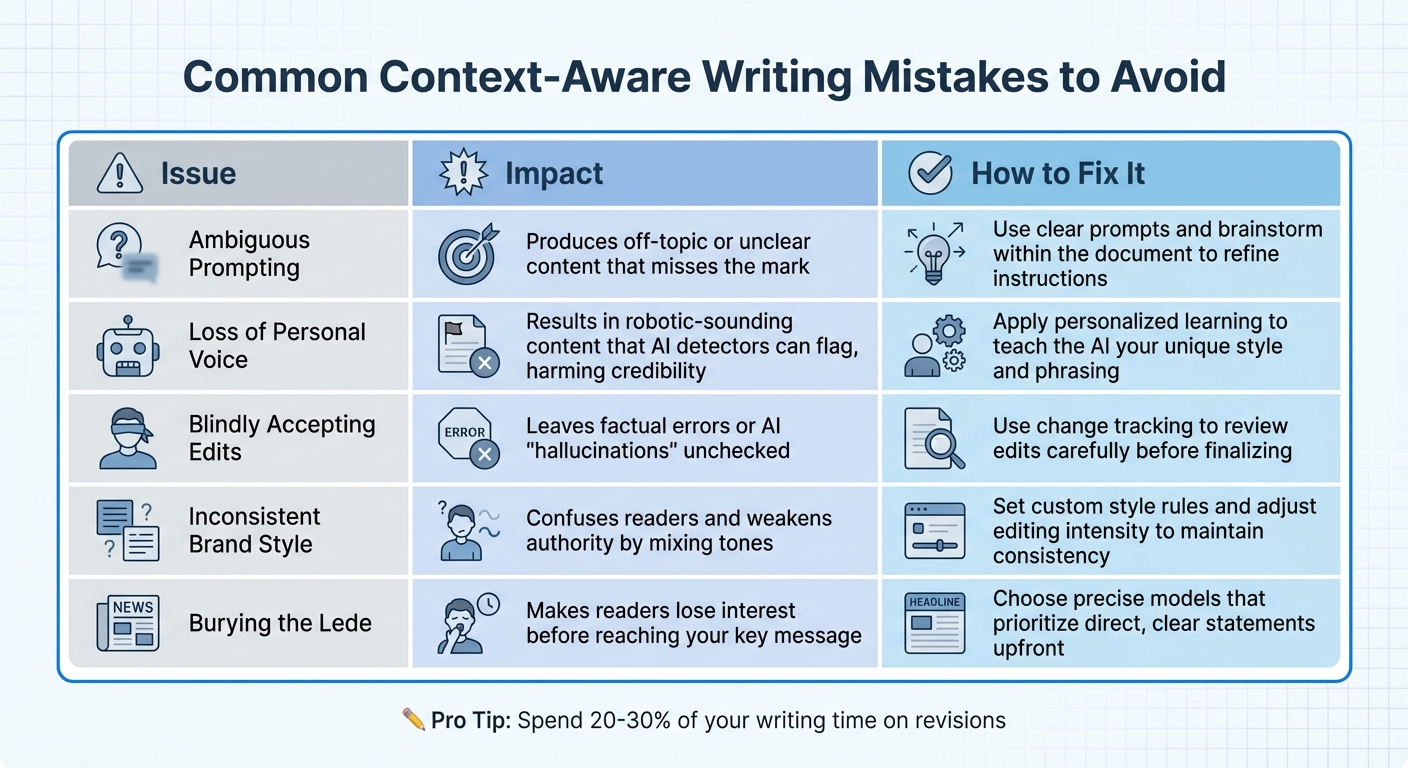
Common Context-Aware Writing Mistakes and Solutions
To maintain clarity and authority in your writing, it’s crucial to steer clear of some common mistakes. Even the most advanced AI tools can’t compensate for careless errors. Relying too heavily on AI without proper oversight can lead to factual inaccuracies. As Christine, a seasoned writer, puts it:
AI requires consistent human oversight and trained writers/editors are the best people to check and edit AI generated outputs.
One frequent issue is using unclear or vague prompts. This often results in content that’s either off-topic or doesn’t make sense. Another misstep is relying on generic language or examples, which can make your content feel disconnected from your audience [23]. Additionally, inconsistent tone - switching between formal and casual styles - can confuse readers and undermine your credibility. It’s also important to understand how AI-generated patterns can impact the natural flow of your writing.
AI outputs can sometimes feel repetitive, with uniform sentence structures that make the content predictable. This lack of variety, often referred to as "low burstiness", is something AI detectors are trained to spot. Another common problem is burying the lede - hiding your main point behind unnecessary details instead of presenting it upfront.
| Issue | Impact | How to Fix It |
|---|---|---|
| Ambiguous Prompting | Produces off-topic or unclear content that misses the mark. | Use clear prompts and brainstorm within the document to refine instructions. |
| Loss of Personal Voice | Results in robotic-sounding content that AI detectors can flag, harming credibility. | Apply personalized learning to teach the AI your unique style and phrasing. |
| Blindly Accepting Edits | Leaves factual errors or AI "hallucinations" unchecked. | Use change tracking to review edits carefully before finalizing. |
| Inconsistent Brand Style | Confuses readers and weakens authority by mixing tones. | Set custom style rules and adjust editing intensity to maintain consistency. |
| Burying the Lede | Makes readers lose interest before reaching your key message. | Choose precise models that prioritize direct, clear statements upfront. |
Spending about 20–30% of your writing time on revisions can make a huge difference. By addressing these common pitfalls, you’ll ensure your content stays polished, professional, and aligned with your goals.
Conclusion
Key Takeaways
When it comes to professional writing, blending context with AI tools can make a big difference. Context-aware writing means combining smart AI features with your personal style and voice. To get it right, start by understanding your audience, defining clear style guidelines, and using tools like in-document brainstorming and tone adjustment to create content that's both efficient and genuine. A checklist can help you stay on track, ensuring you cover everything from adjusting editing intensity to carefully reviewing AI suggestions with change tracking.
Revisions are where the magic happens. Experts suggest dedicating 20–30% of your writing time to revisions. This is the step that takes your work from good to great. Tools like Revise can act as a helpful partner, ensuring consistency across different formats - whether you're working on emails, reports, or social media - and catching errors that might slip past you.
FAQs
How can I adjust my writing style to connect with different audiences?
To truly connect with your audience, start by getting to know them - what they care about, what they need, and how they prefer to engage. Think about their goals, how much they already know, and what they expect from your content. For instance, executives might appreciate a formal, data-rich approach, while busy professionals may prefer quick, conversational insights. On the other hand, non-technical readers might benefit from straightforward, jargon-free explanations. Tailor your tone, word choice, and level of detail to fit their preferences.
After identifying these aspects, tools like Revise can be a game-changer. It offers suggestions for adjusting tone, applying custom style rules, and keeping your message sharp and consistent. Also, consider your audience’s environment and the time they have to engage with your content. For readers pressed for time, concise bullet points might be more effective. For those who learn visually, adding charts or images could make a big difference. By paying attention to these details, you can craft content that not only speaks to your audience but also inspires them to take action.
What are some best practices for using AI tools like Revise to enhance professional writing?
To get the best results from AI tools like Revise, start by crafting clear, detailed prompts. Think of your prompt as a mini-brief. Specify the role you want the AI to assume (e.g., "Write as a marketing professional drafting a proposal"), highlight your main objectives, and include any essential details. For more complex tasks, break them into steps to keep the AI focused and on track. Including examples or specifying your preferred tone and style can also help guide the AI toward better results.
When the AI generates a draft, treat it as a foundation, not the final product. Carefully review the content for accuracy, adjust the tone to fit your audience, and make sure it aligns with any organizational standards. Revise offers features like change tracking and custom style rules to help refine the draft while preserving your personal voice. However, always complete a final human review to ensure the quality and confidentiality of the work. AI is a tool to enhance your workflow - not a replacement for your expertise.
How can I use AI tools for writing while keeping my unique voice?
To keep your personal voice intact while working with AI tools, start by crafting clear and detailed prompts that mirror your unique style. Include examples of your tone, phrasing, and any specific traits - whether it’s humor, industry jargon, or a conversational approach. Once the AI generates content, take the time to review it and tweak sections that feel too generic, ensuring your distinct personality shines through.
Make use of AI features like tone settings, style rules, or voice profiles to tailor the output to your preferences. Over time, the AI will learn your patterns, producing suggestions that better align with your style. Tools like Revise, which include options such as change tracking and tone adjustments, can be especially useful for fine-tuning content while staying true to your voice. With consistent practice, these tools can boost your productivity without compromising your authenticity.