OpenClaw in Academic Writing and Research

OpenClaw simplifies academic research and writing by automating time-consuming tasks. From managing citations to summarizing papers, it helps researchers save up to 23 hours a week on repetitive work, allowing them to focus more on their core studies.
Here’s what OpenClaw does:
- Processes PDFs, extracts metadata, and organizes research summaries.
- Manages citations in various styles like APA, MLA, and Chicago.
- Maintains context across projects with persistent memory.
- Integrates with tools like Zotero and Slack for seamless workflows.
- Automates systematic reviews, saving hours of manual effort.
For example, OpenClaw analyzed 34 academic papers in just 5 minutes - a task that would take a human half a day. With features like local data processing, automated literature reviews, and structured outlines, it’s a powerful tool for researchers tackling complex projects.
Main Features of OpenClaw for Academic Research
OpenClaw shines as a tool tailored for academic work, offering features that minimize routine tasks and allow researchers to focus on deeper analysis. It takes care of technicalities like processing PDFs, managing citations, and maintaining long-term context, making it a valuable companion for scholars.
PDF Processing and Metadata Extraction
OpenClaw simplifies working with academic papers through its built-in PDF tool, which forwards documents to AI models such as Anthropic's Claude and Google's Gemini. Using pdf.js, it extracts structured text and metadata like titles, authors, publication years, and DOIs. For scanned documents without machine-readable text, OpenClaw integrates OCR tools like Tesseract to convert images into searchable content.
For lengthy documents (over 200 pages), OpenClaw breaks the text into manageable chunks - 1,000-token windows with a 200-token overlap - ensuring continuity. The extracted data is then vectorized and stored in databases like Redis or SQLite using Retrieval-Augmented Generation, making it accessible via natural language queries.
Additionally, the Research Summarizer skill organizes this data into structured briefs following the IMRAD framework (Introduction, Methods, Results, Analysis, Discussion). This feature transforms raw PDFs into concise summaries. One setup guide highlights the platform's local processing capability:
"With a self-hosted OpenClaw setup, the PDF never leaves your machine. The agent reads the file locally... Your raw documents stay on your hardware".
This localized processing is especially useful for researchers handling unpublished or confidential data.
The extracted data integrates seamlessly with OpenClaw's citation and content management tools, streamlining the research workflow.
Citation Management and Formatting
OpenClaw can reformat bibliographies into various journal styles, including Nature, APA 7, MLA 9, Chicago 17, and Vancouver. It also identifies missing DOIs, fixes inconsistencies in author names, and retrieves full bibliographic details from source databases. Each summary or draft section links directly to a searchable reference, acting as an "external research brain".
Through API integrations like Composio, OpenClaw syncs with tools like Zotero and Mendeley, enabling users to create entries with complete metadata and AI-generated summaries. It even generates citation graphs to visualize influential works.
Dr. Sarah Chen, an Assistant Professor in Neuroscience, shared her experience:
"I used to spend half my time just trying to remember what I'd read. Now I process papers in minutes and can actually find my notes when I need them".
Outline Creation and Persistent Memory
OpenClaw also excels in organizing and retaining research context. Using persistent memory stored in Redis or SQLite, it ensures continuity across sessions - ideal for long-term projects or grant proposals.
The platform can create structured outlines tailored to your research objectives, drawing from the literature it has processed. Automated features, like cron jobs, can handle recurring tasks such as sending weekly literature updates. Researchers can also chain tasks using the /pipe operator (e.g., search-papers → process-pdf → extract-notes), creating efficient workflows.
Dan Peguine noted the value of this feature:
"Memory is amazing, context persists 24/7".
With persistent infrastructure like Blink Claw, OpenClaw can even operate overnight, delivering structured summaries of the latest research by morning.
sbb-itb-df9dc23
How to Use OpenClaw for Academic Writing
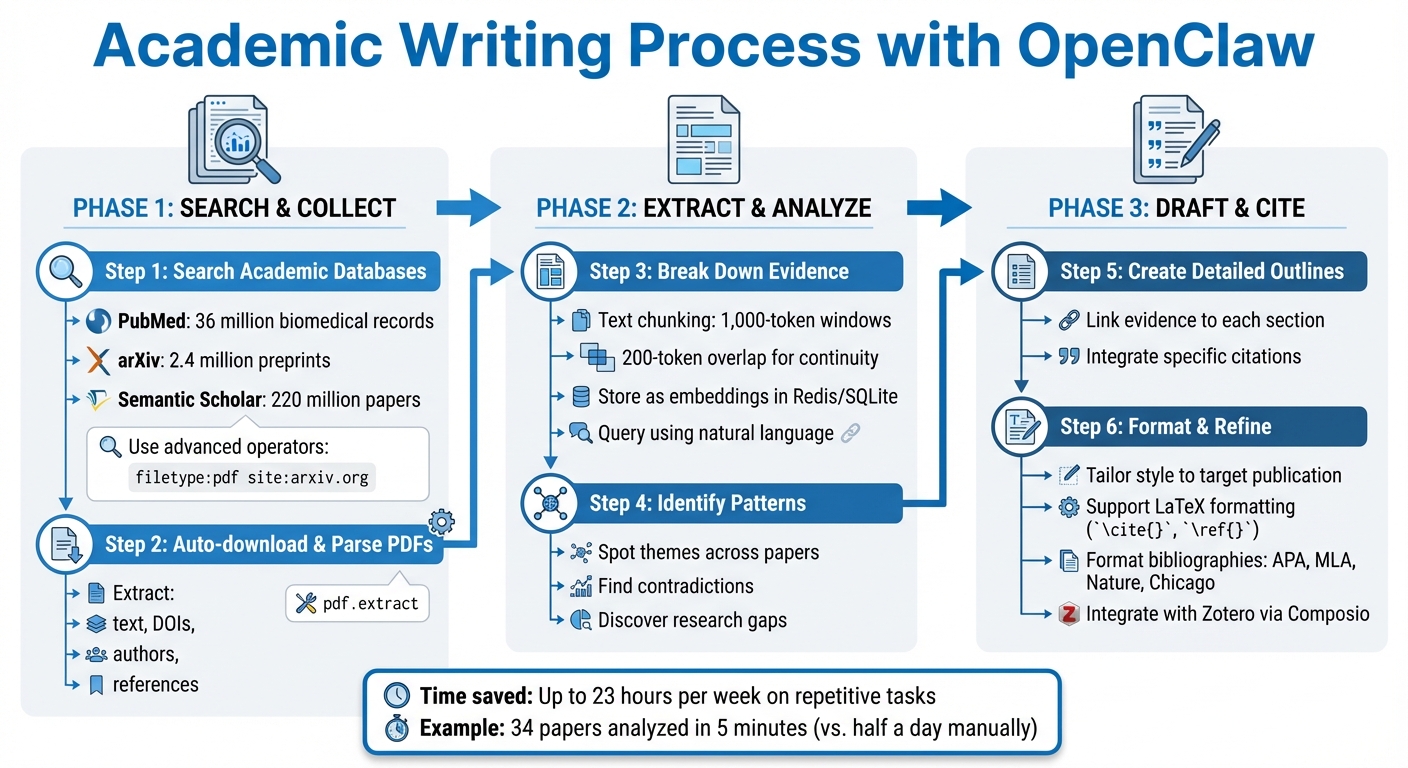
Step-by-Step Academic Writing Process with OpenClaw
OpenClaw turns academic writing into a smoother, more efficient process. By combining its PDF and citation tools with a structured approach, you can move seamlessly from research to a polished manuscript. The key is breaking the process into clear phases, where each step builds on the last.
Let’s dive into how OpenClaw simplifies academic writing.
Step-by-Step Writing Process with OpenClaw
Start by searching academic databases using OpenClaw's browser tool. You can explore resources like PubMed (with over 36 million biomedical records), arXiv (2.4 million preprints), or Semantic Scholar (220 million papers). Use advanced search operators such as filetype:pdf site:arxiv.org to refine your results. Once you’ve identified relevant papers, OpenClaw’s pdf.extract tool can automatically download and parse them. It pulls out text, DOIs, author details, and references for easy access.
Next, extract evidence with text chunking. This involves breaking down key findings into manageable sections - 1,000-token windows with a 200-token overlap. These chunks are stored as embeddings in Redis or SQLite, making it simple to query your reading history using natural language. This system helps you quickly spot themes, contradictions, and research gaps across a large volume of papers.
When it’s time to draft and integrate citations, OpenClaw shines. It helps you create detailed outlines that link specific evidence and citations to each section of your work. If you’re targeting a particular publication, the academic-writing-refiner skill tailors the style to fit - whether it’s concise and technical for NeurIPS or more linguistically precise for ACL. OpenClaw also supports LaTeX formatting, preserving elements like \cite{}, \ref{}, and equations. For citation management, it integrates with Zotero via Composio, which organizes references, pins summaries as notes, and formats bibliographies in styles like APA, MLA, Nature, or Chicago.
Improving Your Research Pipeline
OpenClaw doesn’t just help with writing - it streamlines your entire research process. During data collection, you can set up automated tasks (e.g., a cron job like 0 7 * * 1) to search for new papers every Monday morning and send summaries directly to platforms like Telegram or Slack. This automation saves time by handling repetitive tasks.
For analysis, OpenClaw can deploy multiple sub-agents to gather insights from diverse sources. These might include official documentation, Reddit discussions, Twitter threads, or competitor research. This approach significantly reduces the time required for systematic reviews, which typically take an average of 30.7 hours. Institutions using AI tools like OpenClaw report handling 2–4 times more work without increasing staff.
When it comes to report generation, OpenClaw can synthesize findings from multiple sources into structured literature reviews. It also helps identify research gaps by comparing claims across different papers. For instance:
"OpenClaw does not make you a better researcher. It removes the 23 hours a week of mechanical work that stands between your research ideas and your published findings".
Maintaining Academic Integrity
OpenClaw includes features to ensure transparency and proper attribution. For example, evidence pointers link specific sentences in your draft to their original PDF source, using Source: <path#line> citations in memory files. This makes it easy to trace AI-generated insights back to their origins.
Using source comparisons, you can evaluate how different references align or conflict. Configuring OpenClaw to compare multiple viewpoints, rather than relying on single-source summaries, helps uncover biases or inconsistencies.
The agent-audit-trail skill adds another layer of accountability by logging all agent actions with tamper-evident, hash-chained records. While OpenClaw can structure and draft your work, the core ideas and technical contributions still need to come from you. By 2025, 58% of researchers reported using AI tools in their work, with 51% specifically applying them to literature reviews. As one user, VPN07, wisely put it:
"OpenClaw should make you a better student, not replace your learning. Use it to absorb more information, organize your thinking, and eliminate administrative friction." – VPN07
Always review and refine AI-generated content before submitting it. Grant reviewers are skilled at identifying AI-written text, so your final manuscript should reflect your own voice and insights.
Advanced Uses of OpenClaw for Research and Writing
OpenClaw goes beyond its basic features, offering tools that cater to complex research and writing tasks.
Managing Long-Term Projects
For extensive projects like dissertations, book manuscripts, or multi-year studies, OpenClaw is a powerful ally. Its persistent memory system, supported by Redis or SQLite backends, keeps a detailed history of your research. This allows you to revisit past findings and track the evolution of your ideas. You can draft chapter by chapter while OpenClaw maintains a source map, linking every section to its original references.
If you're monitoring literature continuously, OpenClaw's 24/7 agents can scan databases like PubMed, arXiv, or Semantic Scholar. These agents automatically sort through new papers and send structured summaries to platforms like Telegram or Slack. A noteworthy example is the news-scanning pipeline (jacob-bd/openclaw-newsroom), open-sourced by Jacob-bd in March 2026. This pipeline scans five sources - RSS, Reddit, X, GitHub, and web search - every two hours, deduplicates the results using SQLite, and sends curated updates to Telegram. This setup makes keeping up with new developments much more manageable.
Data Analysis and Structured Reports
OpenClaw simplifies data extraction by converting study parameters into CSV or Markdown formats, saving time and effort during systematic reviews. For instance, the AgentPatch team used OpenClaw in March 2026 to analyze 34 papers on federated learning from arXiv. The agent grouped the papers into five themes (e.g., privacy-preserving FL, communication efficiency), identified the key research question for each theme, and pinpointed the most influential paper in each group. This entire process, which would typically take a human researcher half a day, was completed in just 5 minutes.
For ongoing projects, OpenClaw supports Retrieval-Augmented Generation (RAG) with vector storage tools like PgVector or RedisVec. This allows it to store embeddings of scraped content, enabling comparisons between historical and current data. You can also use its "pipe" operator to automate workflows, such as search-papers -> process-pdf -> extract-notes, creating a smooth transition from discovery to organized knowledge storage.
Setting Up OpenClaw for Research Teams
Research teams can benefit from deploying a network of specialized agents, such as Researcher, Writer, and Data agents, all coordinated by a "Main Orchestrator" (often Claude Sonnet 4.5). This orchestrator assigns tasks based on confidence thresholds. To ensure alignment, a shared context file (shared/project-context.md) keeps everyone updated on project progress, tools, and team guidelines.
Cloud platforms like Blink Claw ($45/month) and ClawCloud (starting at $25 credit) offer 24/7 operations for overnight reviews and scheduled updates. Additionally, SlackClaw provides a dedicated server for each team, complete with persistent memory. This allows agents to accumulate institutional knowledge and adapt to specific lab terminology over time. By integrating these tools, research teams have reported a 2–4× increase in workload capacity and 30–60% reductions in time spent on manual library tasks.
Conclusion
OpenClaw simplifies academic writing by cutting down up to 23 hours per week of repetitive tasks like administrative work, data collection, and document review - giving researchers more time to focus on their core studies. By automating tedious processes that often delay the journey from idea to publication, it empowers scholars to dedicate their efforts to deeper analysis and discovery.
On top of these time-saving features, OpenClaw boosts productivity through its autonomous functionality and persistent memory. Its 24/7 automated operation can handle tasks like overnight literature reviews, delivering well-organized summaries and accurate citations. With its ability to retain context across sessions, OpenClaw acts as a "second brain", referencing previous research notes and maintaining continuity for long-term projects.
Academic integrity is at the heart of OpenClaw's design. Its local-first architecture ensures that sensitive data, such as unpublished manuscripts and IRB-protected materials, stays securely under your control. Additionally, its "Do Not Add Content" approach focuses on refining existing text without generating unsupported claims, results, or citations.
Institutions using OpenClaw have reported a noticeable increase in workload capacity and significant time savings on manual tasks. Whether you're a graduate student, researcher, or educator, OpenClaw can seamlessly integrate into your workflow, assisting with systematic reviews, grant proposals, and other academic projects. By merging automation with academic precision, OpenClaw reshapes the way scholarly work is done - allowing you to concentrate on the research that truly matters.
FAQs
How do I set up OpenClaw to keep my PDFs local?
To ensure your PDFs stay local when using OpenClaw, you’ll need to configure its workspace to store files directly on your machine. Start by creating a folder on your computer (for example, ~/my-openclaw-workspace/). Then, set this folder as the workspace directory in OpenClaw's settings. You can add PDFs to this folder or specify their file paths when working with the tool. This setup keeps all your files stored locally, avoiding the need to upload them to external servers.
Can OpenClaw keep citations accurate across drafts?
OpenClaw ensures accurate citations across drafts by systematically handling references and pulling DOIs during the literature review phase. This approach not only keeps your citations consistent but also saves time when polishing your research.
How do I use OpenClaw for a systematic review?
Using OpenClaw for a systematic review allows you to simplify complex tasks such as identifying relevant studies, extracting critical data, and summarizing findings. To get started, clearly define your research question to guide the review. Then, take advantage of OpenClaw’s AI capabilities to automate database searches and organize the data you collect. Its tools can also help you screen the data efficiently and compile everything into a polished, publication-ready report. This approach reduces manual workload while keeping the review process organized and efficient.